
For the past few months at Storyals, Copilot Cowork has quietly become part of how we work - drafting documents, preparing for customer meetings, and helping us stay on top of increasingly complex calendars. Through Microsoft’s Frontier preview, this capability was available at no additional cost. But on June 16th, 2026, Copilot Cowork reached general availability - and Microsoft introduced Copilot Credits, a usage-based model for these more advanced capabilities. In this post, we’ll explain what Copilot Credits are, why they come at a cost, and how you should plan for this change.
Copilot Cowork introduces a shift from AI as an assistant to using AI as a digital co-worker, capable of handling more complete, multi-step workflows. If you are new to Cowork you can learn more about this evolution in more detail in our earlier post, Copilot Cowork: from AI assistant to digital co-worker.
From a flat fee to a metered: what actually changed
Until now, Microsoft 365 has been beautifully predictable: buy a license per user, and people use the included features at no additional cost. Copilot Credits add a second layer on top of that model.
- A Microsoft 365 "Premium" Copilot license as a base. Cowork requires a Microsoft 365 Copilot ”Premium” license, listed at $30/user/month for enterprise and $20 for smaller businesses.
- Cowork's work is metered. In addition to the flat license fee, tasks you assign to Cowork are billed separately in Copilot Credits, priced at $0.01 per credit under a “pay-as-you-go” setup.
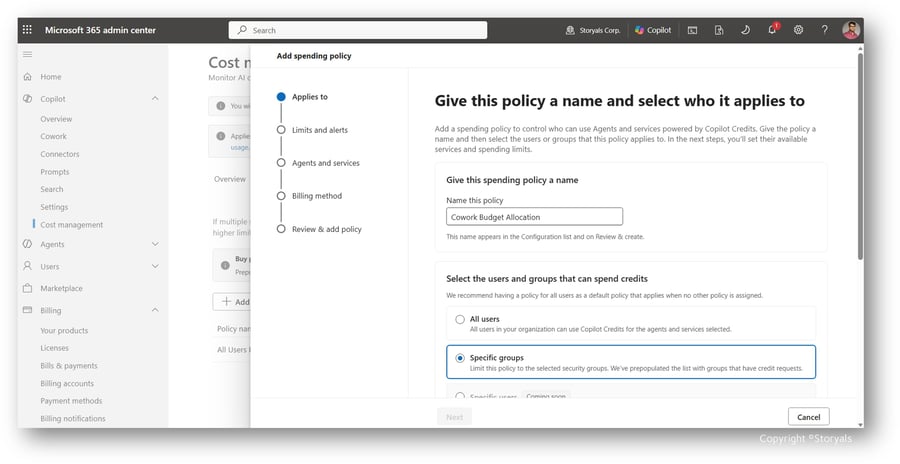
- It's off by default. Cowork stays disabled until an admin turns it on and sets spending limits - so no one runs up charges until IT deliberately opts in.
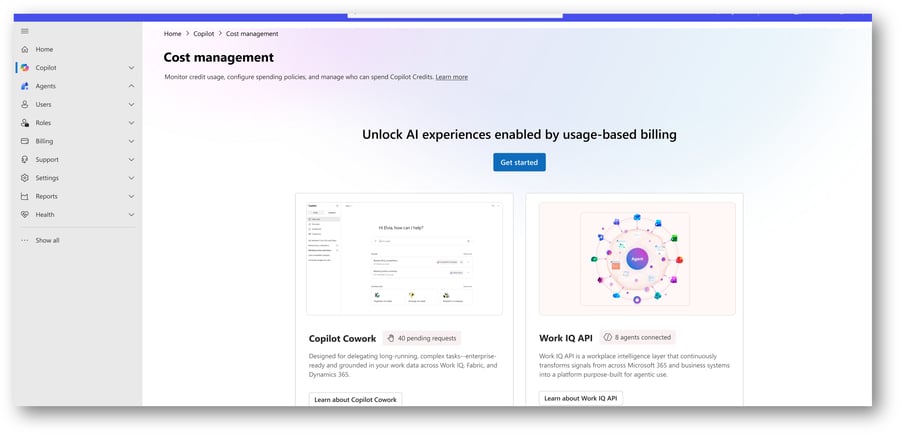
Credits are a shared "currency" across Microsoft's usage-based services - Cowork today, Work IQ APIs, and probably more over time - pooled at the tenant level so you can manage spend centrally. You can read more about Copilot Credits in the Microsoft Learn article: “Usage-Based Billing and Cost Management for Copilot Credits”.
Powerful - and that's exactly why it costs
So why the change? Microsoft's Charles Lamanna put it plainly: the new model is "like filling up your gas tank at the pump," because one flat fee can't fairly cover users who consume wildly different amounts of compute.
It helps to remember what's actually happening under the hood. A Cowork task isn't a quick chatbot reply - it can read thousands of files, reason across your data, call tools, and run for minutes (or longer) on frontier-grade models like Anthropic's Opus 4.8 and Sonnet 4.6. The actual cost in terms of consumed Copilot Credits is based on four components: model use, context retrieval, tool calls, and runtime. The more ambitious the task, the more it burns.
Microsoft sorts that into three rough bands - useful as a mental model, not a fixed price list:
- Light (~100–300 credits, ≈ $1–$3) - a quick summary or a Monday status update.
- Medium (~400–700 credits, ≈ $4–$7) - pull emails, calendar, and files into a meeting-prep briefing.
- Heavy (700+ credits, ≈ $7 and up) - analyze six months of data and produce a leadership-ready report.
You can run the prompt “/Cost” in Cowork to see the actual spending.
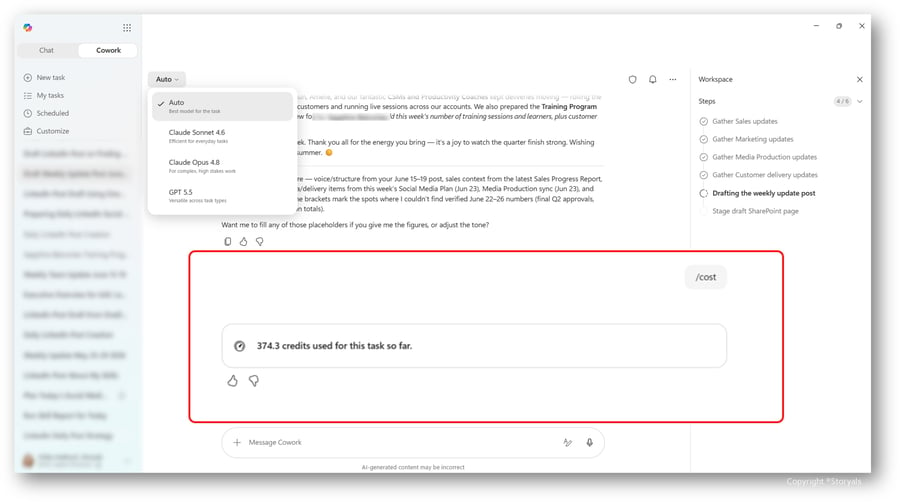
The encouraging news, in Microsoft's own framing, is that many everyday tasks really do cost cents, not dollars. The catch is what happens when you multiply.
The numbers that deserve your attention
We'll be honest, the numbers do add up, and this is where leaders need to lean in. Individually, credits are cheap; at scale, agentic usage adds up fast. Analysts estimate a single user running ~10 light tasks a day lands at around $20–$60 a month in credits - but swap in a few heavy tasks, and that can easily double or triple. Multiply across a workforce and the totals get real: one published calculator models a mixed 200-person Copilot Cowork usage at roughly $46,000 a month - over $550,000 a year on pay-as-you-go.
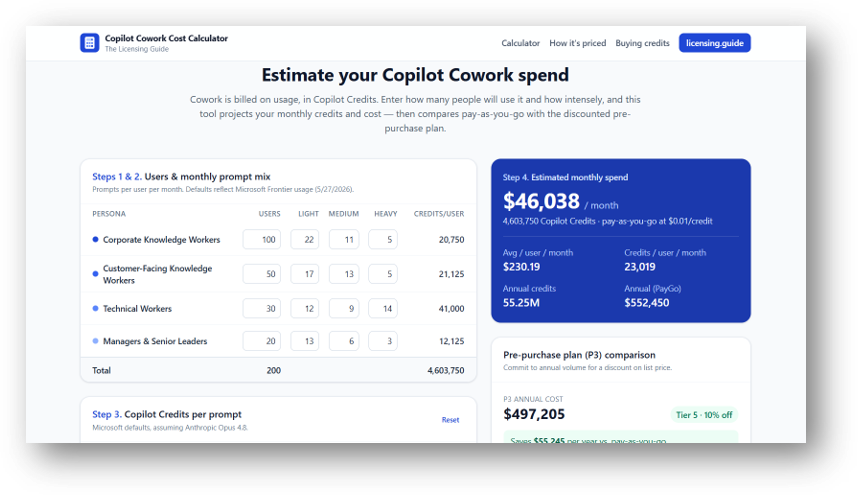
We recommend you have a look at the Copilot Cowork Cost Calculator developed by Jukka Niiranen as part of his Licensing guide to look into cost modeling for your organization. This is an easier tool than the CustomerCoworkEstimator.xlsx Microsoft provides.
The above examples are illustrative, and your actual usage will of course vary - but the lesson is simple: switch Cowork on without spending controls or upskilling, and you've effectively opened a tab with no ceiling. No leader wants that!
Our recommendation: Tier AI across users, tasks, and commitment
Here's the big shift in mindset - advanced AI is no longer a fixed line item, it's a variable operating cost. That makes tiering - deciding who gets what, and how you pay for it - the central leadership question. You need to be able to balance cost control with innovation. Three levers matter most:
- Tier your users - You don't have to switch Cowork on for everyone on day one. Identify the roles where autonomous, multi-step work clearly pays for itself - analysts, customer-facing teams, time-poor leaders - and start there. These are probably the ones already using Microsoft 365 Copilot Premium extensively. Analyze your Copilot Dashboard and your Digital Skills Profiling.
- Tier the tasks - A huge share of value still comes from Copilot Chat, which is included in the Microsoft 365 license seat at no extra cost, or the Copilot Chat with WorkIQ that comes with the Premium version of Microsoft 365 Copilot. Reserve paid Cowork runs for genuinely complex, multi-source, multi-output work - and ensure you are continually building digital skills so users understand when to use what.
- Tier the commitment. Pay-as-you-go (PayGo) offers maximum flexibility with no waste; there is also a pre-purchase plan, called “P3” where you commit to an upfront volume commitment for a discount in return. Most organizations are wise to start with Pay-as-you-go to learn their real patterns, then move to P3 once usage is predictable.
A new line on the budget — and a new leadership skill
Copilot Credits mark a real turning point: the era of fixed licensing for advanced AI is ending, and the era of AI as a metered, cloud-like utility has begun. That's not something to fear - it's something to manage. The leaders who pull ahead will be the ones who pair a clear view of value with financial discipline on cost, and who treat AI usage as exactly what it now is: a budgetable resource that, used well, pays for itself many times over.
Our advice is the same one we give for every big shift - start small, stay curious, and learn by doing. Turn it on for a selected group of users, watch what it costs and what it returns, and let real numbers guide your next step. We recommend our “Get started with Cowork” workshop, where users can get hands-on experience using Cowork in a sandboxed environment where they can learn about Cowork before it is enabled in your organization.
Watch the Video Blog
Looking for a quick overview? This video blog summarizes the key concepts, best practices, and actionable takeaways from this article, helping you apply these insights in your organization and get more value from Microsoft 365, Copilot, AI, and modern workplace tools. Watch the episode below.