
For the past few years, AI adoption experts have been talking about“prompt engineering” and the importance of learning the art of prompting. Knowing how to prompt is still important - but if you've been watching the language around Copilot and AI agents lately, you've probably noticed a new word quietly taking over – “skills”. Skills represent the next shift in how organizations get value from AI: moving from prompting - where every employee has to write down the correct steps every time - to packaging expertise so Copilot and agents can apply it consistently. In this blog post, we'll give a high-level overview of what "skills" actually means across the industry, and in the Microsoft ecosystem more specifically, and provide recommendations to leaders.
What does "Skills" actually mean?
The word "Skills" is being used in at least two very different ways, and it helps to separate them.
The traditional meaning comes from HR and refers to a person’s skills. The concept of a "skills-based organization" is looking beyond job titles to understand what people can actually do. That thinking has been around long before generative AI, and it’s something that we at Storyals are heavily vested in when it comes to identifying and developing an individual’s digital skills.
The newer meaning comes from the AI-agent world, and it's the one driving the current buzz. In late 2025, Anthropic introduced Agent Skills - described as "organized folders of instructions, scripts, and resources that agents can discover and load dynamically to perform better at specific tasks," and later published as an open standard for cross-platform portability. OpenAI has framed its own version similarly - reusable, shareable workflows that tell the AI how to do a task more consistently. The common thread is a simple text file, usually called SKILL.md, that carries a name, a description, and step-by-step instructions.
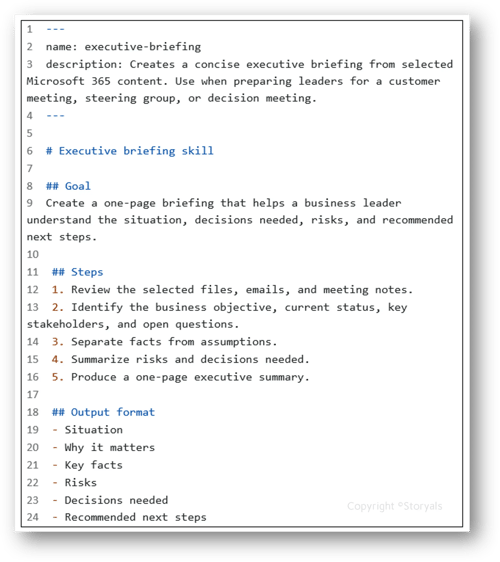
Anthropic's own analogy is the one we like best: building a skill for an agent is like writing an onboarding guide for a new colleague. You're not teaching them everything at once - you're handing them the specific playbook for a specific task - the moment they need it.
How "skills" show up in the Microsoft ecosystem
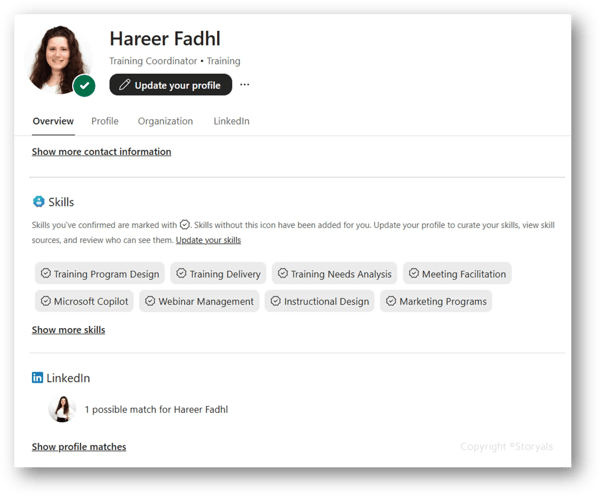
Microsoft is now adopting this same pattern inside their ecosystem - but because Microsoft blends the HR meaning and the AI-agent meaning, "skills" in their world actually refers to these things:
1. People skills - a workforce-intelligence layer that builds skill profiles for employees, mapped to a customizable taxonomy, and surfaces them across Microsoft 365. Admins can start from an out-of-the-box library of more than 16,000 skills or import their own. You can learn more about People Skills in our blog post, Introducing People Skills in Microsoft 365.
 2. Agent & App skills - reusable instruction packages that tell an agent how to do a repeatable task. A skill is typically defined by a name, a description, and Markdown instructions. The skill is saved in a markdown file named skills.md and loaded when the agent is asked to execute the task. Microsoft is now introducing skills into many of our everyday apps in Microsoft 365:
-
Copilot in Excel now supports skills for repeatable spreadsheet work (with a heavy focus on finance) like closing the books, refreshing a monthly model, or preparing a variance analysis. You can invoke a skill with an @mention and create custom skills for your specific business workflow.
-
Copilot in SharePoint lets you turn a repeatable, multi-step workflow into a reusable skill, saved as a Markdown file in the site's Agent Assets library. Examples could include, checking that files in a document library follow a specific format or pattern, or applying custom formatting to a list.
Source: Copilot in Excel: Built for the era of Frontier Finance | Microsoft 365 Blog
-
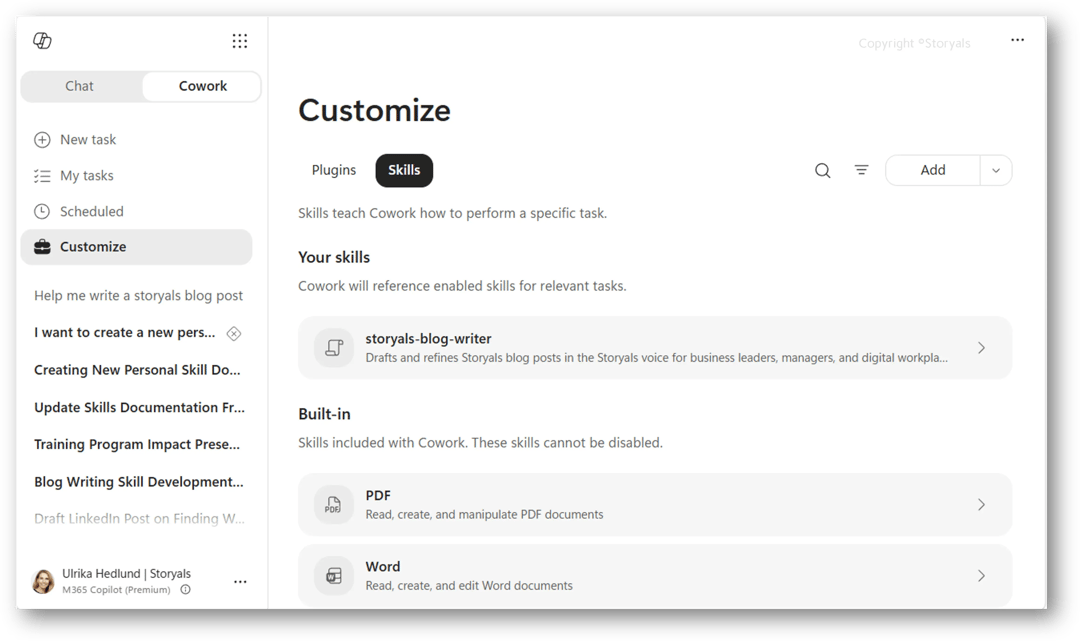
Copilot Cowork - which reached general availability worldwide on 16 June 2026, ships with built-in skills for Word, Excel, PowerPoint, email, scheduling, research and more, and lets you add up to 50 custom skills. Read more about Copilot Cowork in our blog post Copilot Cowork: AI Assistant to Digital Co-Worker.
Underneath all of this sits the connective tissue - Microsoft Graph, semantic indexing, and Work IQ - which grounds these experiences in your organization's real data while respecting permissions and tenant boundaries. That's what lets a skill act on your files, people, and context rather than generic knowledge.
What skills are - and aren't
We'll be candid, because the hype tends to skip this. A skill is not magic automation. SharePoint skills only do what Copilot in SharePoint can already do. People Skills profiles are signals for discovery and development - not a performance verdict. The practical implication is a mindset shift: treat skills as business-process assets, not throwaway prompts. Invest time in articulating and documenting your work processes (with the help of Copilot, of course). Anything that includes scripts should be reviewed the way you'd review third-party code - with trusted sources, approvals, and an audit trail.
Recommendation for Leaders
The first adoption layer was prompting. The second was agents. Skills are the third - the point where the best way of doing repeatable work stops living in one expert's head and becomes something Copilot can apply for everyone. That's a genuinely exciting shift, and it rewards organizations that are intentional and can articulate and document their processes.
If your teams are still finding their footing with Copilot and agents, that's exactly the right place to start - see our post on learning to work with agents in Microsoft 365 Copilot, and how we help organizations go further with the Microsoft 365 Copilot Frontier Program.
Watch the Video Blog
Looking for a quick overview? This video blog summarizes the key concepts, best practices, and actionable takeaways from this article, helping you apply these insights in your organization and get more value from Microsoft 365, Copilot, AI, and modern workplace tools. Watch the episode below.