
Update 2: November 2, 2026 - Copilot Notebooks has been renamed Copilot Workspaces. This post has been refreshed again to reflect the new name, the shift to team collaboration, and updated licensing, plus a new FAQ section.
Update 1: March 3, 2026 - This post has been refreshed to reflect the latest Copilot Notebooks experience and recent product updates.
In the ever-evolving world of Microsoft 365, where the longevity of product names often feels more like kids’ rub-on tattoos than permanent ink, the term "Notebook" has been used to refer to two very different tools: Microsoft OneNote Notebooks and “Copilot Notebooks”. Case in point: Copilot Notebooks has now been renamed Copilot Workspaces! While they have shared the same name, their purposes and functionalities are very different. In this blog post, we will provide clarity, focusing specifically on Copilot Workspaces—how you can benefit from using them, current limitations, and recommendations for how to embrace this new technology.
Two “Notebooks” - One name, very different use cases
When someone says “notebook,” most of us think about a Microsoft OneNote notebook - your digital binder for organizing ideas and sharing notes with others. But with the announcement of Microsoft 365 Copilot Notebooks, in the Spring Wave 2 update in April 2025, the term took on a new meaning. While OneNote Notebooks remain the “go-to” place for capturing and organizing notes, Copilot Notebooks function more like structured portfolios of information, designed to be leveraged by your Microsoft 365 Copilot AI assistant to deliver targeted insights and contextual guidance.
In October 2026, Microsoft started renaming Copilot Notebooks to Copilot Workspaces, to reflect a stronger focus on team collaboration. If you already use Copilot Notebooks, don’t worry: your existing notebooks automatically become workspaces, and all content, sharing settings and links stay as they are.
Copilot Workspaces explained
So what are Copilot Workspaces then? A Copilot Workspace is a shared space where you bring together the information for a project or topic, so Copilot can answer questions and create content grounded in that specific context. If you’ve used Google NotebookLM, you’ll find the concept quite familiar. If not, you can think of a workspace as a curated collection of information that you can interact with using Copilot for a more refined outcome. Workspaces are designed to bring together resources from across Microsoft 365 — including Copilot chats, files, pages, meeting notes and links. By adding the information that is relevant to your specific scenario, you can get better outcomes from Copilot. Copilot Workspaces are stored in a container in something called “SharePoint Embedded” and are accessible in the Microsoft Copilot app (previously called the Microsoft 365 Copilot app) and in OneNote.
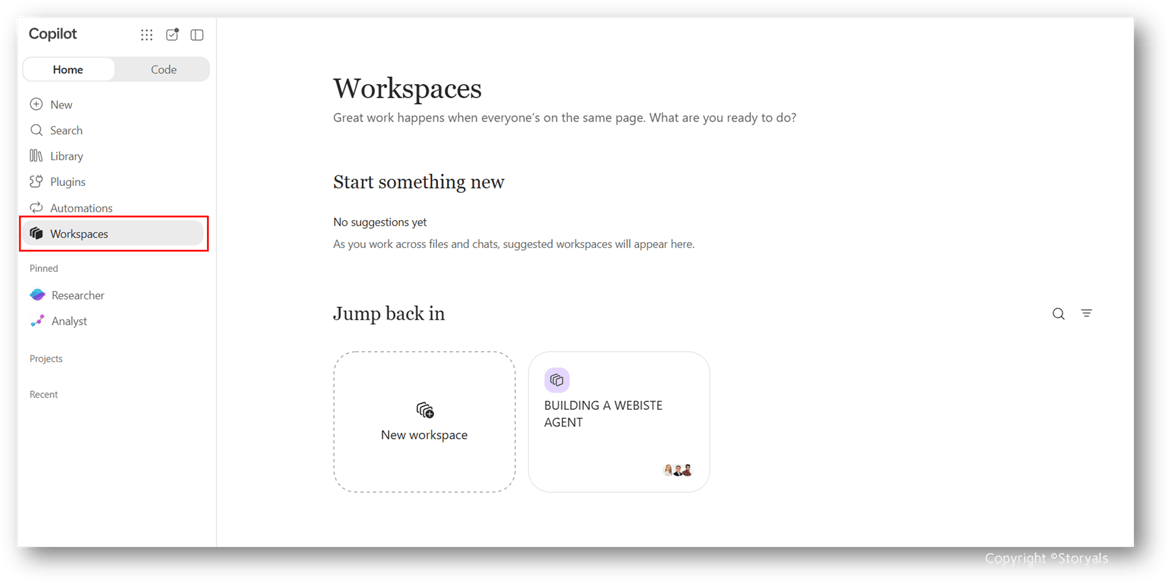 If you want to know more about how Copilot Workspaces are stored and managed, refer to the Microsoft Learn article about Copilot Pages and Copilot Notebooks storage.
How can you benefit from using Copilot Workspaces?
Some of us love diving into new capabilities the moment they’re released. Others - let’s be honest, most people - prefer to understand the business value before investing time in learning something new. So let’s look at a few practical examples.
Imagine you’re a Marketing Manager preparing for a product launch. You want help in crafting a compelling campaign based on past experiences and your new product. Instead of asking Copilot Chat and getting somewhat generic suggestions, you can create a Copilot Workspace. Add information from external websites about your previous campaigns, your new product, and any other relevant information, then ask Copilot for campaign ideas or insights based on your workspace. You’re essentially guiding the AI to your specific information, so the results are far more tailored and useful. And since workspaces are now built for teams, you can invite your campaign team to work on it with you.
Let’s say you’re in sales, preparing for a high-stakes customer meeting. You can gather everything you have on that customer - presentations, past orders, annual reports - into a Copilot Workspace. Then ask Copilot to help you shape a pitch that speaks directly to your customer’s needs.
Finally, let’s take the example of a legal counsellor needing to ramp up on a new case. You can add all the background materials into a workspace, give Copilot instructions like, “use conversational language” and then ask Copilot to generate an audio summary of the information so that you can listen and learn on the go on your mobile device. Talk about smart, new digital ways of working!
Licensing for the various Microsoft 365 capabilities
To add to the confusion, you also have “Pages”. You have pages in a OneNote notebook, and “Copilot Pages”, which are pages that are intended for easily saving and refining information from Copilot chats. You can learn more about Copilot Pages in our blog post, “Get started with Copilot Pages”. The different types of “Pages”, “Notebooks” and “Workspaces” involve different licensing requirements from Microsoft.
|
Capability |
Required Microsoft license |
|
Copilot Pages |
OneDrive license (Entra ID account required) - can be used by your Frontline workers without the full Office apps |
|
OneNote Notebooks |
Free for personal use, included in Microsoft 365 Business plans for business use |
|
Copilot Workspaces (formerly Copilot Notebooks) |
Included with Microsoft 365 Copilot Chat, which comes at no extra cost with eligible Microsoft 365 plans (a SharePoint or OneDrive license is required). A Microsoft 365 Copilot license unlocks premium sources and AI capabilities. |
Recommendations
Copilot Workspaces have evolved significantly since they were first introduced as Copilot Notebooks. While there are still limitations, they already offer a powerful way to start working more intentionally with AI - grounding Copilot in the right context, and now also doing it together with your team. With the speed of innovation in Microsoft 365 Copilot, it’s better to just get started. The technology is moving fast—but our own behaviors and ingrained ways of working aren’t. That’s why it’s so important to encourage continuous learning and to spread awareness about new ways of working.
If you’re looking for support on this journey, feel free to reach out to us at Storyals. We offer engaging, hands-on learning experiences through our Microsoft 365 Copilot Kick-start program - designed both for organizations just getting started in their Microsoft 365 Copilot journey, and for those already onboard with the ambition to become a Frontier Firm.
Frequently asked questions
Is Copilot Notebooks the same as Copilot Workspaces? Yes. Microsoft renamed Copilot Notebooks to Copilot Workspaces, with rollout starting in late October 2026. Existing notebooks automatically become workspaces, and their content, sharing settings and links stay the same.
What is the difference between a OneNote notebook and a Copilot Workspace? A OneNote notebook is a digital binder for capturing and organizing notes. A Copilot Workspace is a shared space where Copilot uses the files, notes, chats and links you add to answer questions and create content for a specific project or topic.
What is the difference between Copilot Projects and Copilot Workspaces? Projects are for your personal work and appear on the Home tab of the Microsoft Copilot app. Workspaces are for working together with others. You can move items from a project into a workspace when you want to share them.
Do I need a Microsoft 365 Copilot license to use Copilot Workspaces? No. Copilot Workspaces are available with Microsoft 365 Copilot Chat, which is included with eligible Microsoft 365 plans. A Microsoft 365 Copilot license gives you premium sources and AI capabilities on top of that.
Where do I find Copilot Workspaces? In the Microsoft Copilot app and in OneNote. The newest collaboration features arrive in the Copilot app first and come to OneNote over time.
Watch the Video Blog
Looking for a quick overview? This video blog summarizes the key concepts, best practices, and actionable takeaways from this article, helping you apply these insights in your organization and get more value from Microsoft 365, Copilot, AI, and modern workplace tools. Please note that the video was created while Copilot Workspaces were still called Copilot Notebooks. Watch the episode below.