
Update 2: November 6, 2026 - to reflect the renaming to Microsoft Copilot Chat, current data protection details and new screenshots.
Update 1: May 23, 2025 - to reflect the renaming of Microsoft 365 Copilot Chat and new screenshots.
In July 2023, Microsoft announced Bing Chat Enterprise, an AI-based chat tool, built on a similar technology as ChatGPT but designed for business users to safely use in day-to-day work. In November 2023 it was officially rebranded to simply Copilot. On January 15th 2025, Microsoft announced the renaming of Copilot to Microsoft 365 Copilot Chat, and in 2026 the name changed once more, to Microsoft Copilot Chat.
With so many Copilots around, it can be quite difficult for users to understand what is what! Microsoft Copilot Chat is included at no additional cost with eligible Microsoft 365 subscriptions. This is an amazing and safe way for your organization to start (or continue) your AI journey. The Copilot that is integrated in the Microsoft 365 apps, and that has access to your internal data such as emails, documents and meetings, is referred to as Microsoft Copilot (previously Microsoft 365 Copilot) and requires a separate license. You can read more about it in blog 5 Essential Rules for Using Microsoft 365 Copilot. Here is a 5-step User Guide that can help users in your organization get started.
1. What is Microsoft Copilot Chat?
Microsoft Copilot Chat is an AI-powered chat tool by Microsoft designed for you to use as a supportive tool for your work. Microsoft Copilot Chat is built on a similar technology as OpenAI's ChatGPT, but when you sign in with your work account, it comes with enterprise data protection. This means your prompts and Copilot's responses are protected by the same commitments as the rest of your organization's Microsoft 365 content, and they aren't used to train the AI models. In addition, Microsoft Copilot Chat uses up-to-date information from the Internet to respond to questions, meaning that you can ask it about current events. It also gives you references to data being used in the responses, which facilitates fact-checking and source reliability.
2. How do I access Microsoft Copilot Chat?
Open a browser window and type in the web address: copilot.cloud.microsoft. Make sure you're logged in with your corporate Microsoft 365 account. That's what gives you enterprise data protection, so your data is safe and secure while you use the chat. Please note that if you're signed in with a personal Microsoft account, you are not using the work version of Copilot Chat, but rather the consumer version of Copilot, which has different terms for how your data is handled.
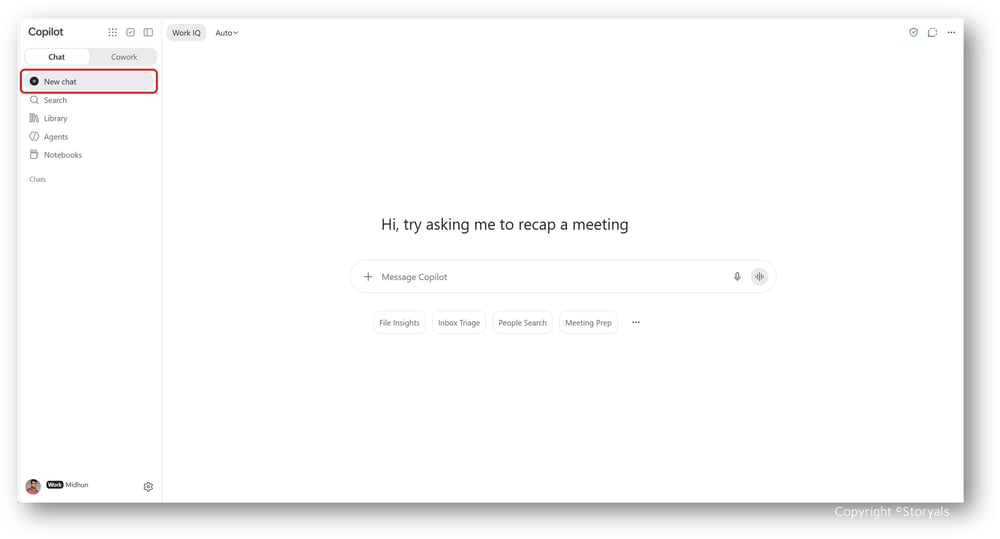
You can also find Copilot Chat in the Microsoft Copilot app on your computer and phone, and directly in Outlook and Teams. If you use Microsoft Edge as your browser, you can open the side panel by clicking the "Copilot" icon in the upper-right corner. Just make sure you're signed in to Edge with your work account.
3. What can I do with Microsoft Copilot Chat?
Microsoft Copilot Chat is a generative AI tool, meaning it can find things for you and generate things for you to help you save time in your work - like your own digital assistant! You can use it to ask questions to get better insights into various topics. For example, "What are the top trends within XXX?" or "What were the key highlights announced at YYY?" You can also ask Microsoft Copilot Chat to summarize a website for you or explain something to you as if you were a 7-year-old (this is useful if you are researching something complex). Unlike traditional web search that just lists links for you with relevant websites, Microsoft Copilot Chat provides a summarized response from various data sources in an easy-to-understand language.
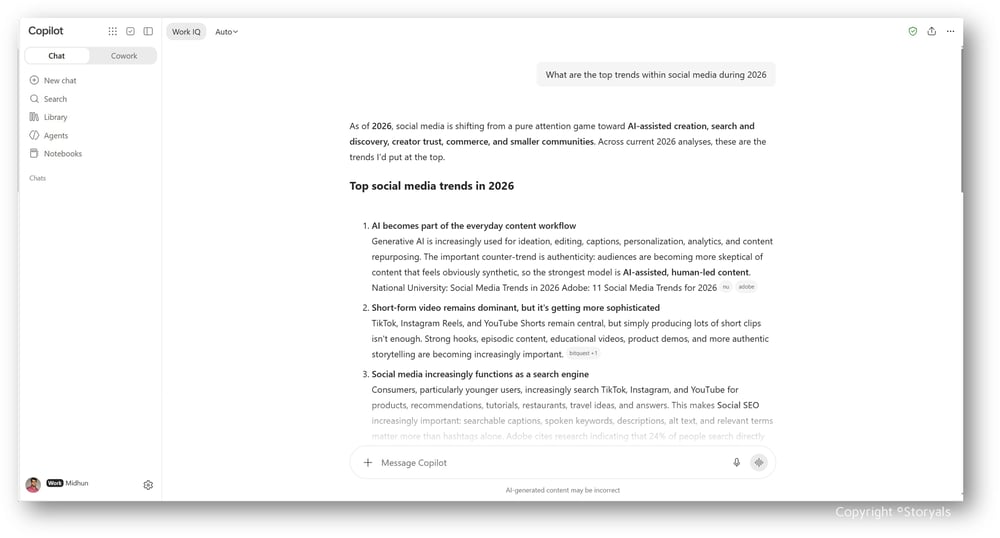
In addition to providing you with better insights, Microsoft Copilot Chat can create draft texts for you. This is where the real superpowers of the tool kick in. Whether you need to write a job description, a news announcement, a product description, or an official correspondence letter, you can have Microsoft Copilot Chat draft it for you. You can also upload or attach a file to your prompt, for example a report you want summarized, and Copilot Chat will work with that content.
4. What do I need to be aware of when I use Microsoft Copilot Chat?
As with all AI-based chat tools, it's important that you don't blindly trust the responses you get, even if the response sounds very accurate and the tool persuasive. The answers being generated are built on a language model that uses probability to provide the best possible answer. It is essential to always check sources and to be aware the response might not be factual.
It's also good to know that your conversations are saved in your Copilot activity history, so you can go back to earlier chats. The history is encrypted and handled under the same commitments as your organization's other Microsoft 365 content, and you can delete it yourself via your My Account portal.
5. What are some power tips for using Microsoft Copilot Chat?
Use natural language and think of Microsoft Copilot Chat as your very own human personal Assistant that has read and understood everything on the Internet - all manuals, all articles, all blog posts, all research reports, etc. The more detailed information you feed into the prompt, the better responses you will get. For instance, if you want it to compose a text for you - provide input as to who the text should be for, what it should be about, how long it should be, etc. Another good tip, if you use Microsoft Edge, is to go to "Settings" > "Copilot and AI" > "Copilot in Edge" > and turn on "Allow Copilot to use browser content" (if you can't find it, your IT administrator may manage this setting for you).
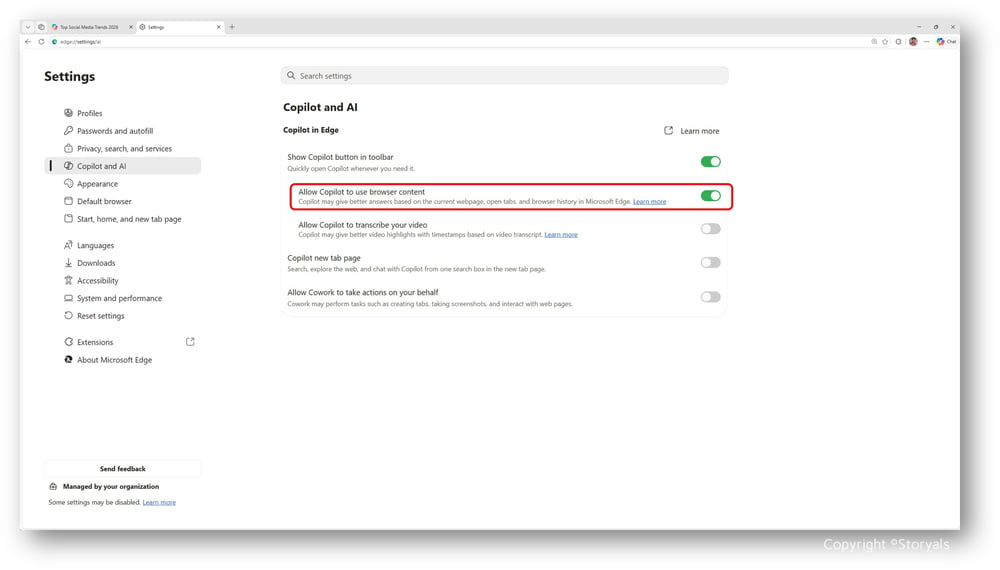
When this is enabled, Microsoft Copilot Chat can access information on the current web page or PDF you are on. This makes for more relevant and useful information gathering and text generation. Again, as long as you're signed in with your work account, your prompts and responses are covered by enterprise data protection and aren't used to train the AI models.
As with all relationships, the more time and effort you invest, the more you will get out of it – same with Microsoft Copilot Chat. Make it a habit of asking questions every day – about everything and anything. Ask it to help you compose text – even if you don't need it. The more you use Copilot Chat, the more valuable you will find it! 😊
The general availability of Copilot was announced for December 1, 2023. Copilot with Commercial data protection (Bing Chat Enterprise) was announced in Preview in July 2023, available for organizations' IT Administrators to enable as an option. In August 2023, it was enabled by default for all organizations that had Microsoft 365 unless it was actively disabled. Today, Copilot Chat is included at no additional cost with eligible Microsoft 365 licenses. IT Administrators can learn more about enabling/disabling Copilot Chat for your organization in Manage Microsoft Copilot Chat.
In November 2023 it was officially rebranded to simply Copilot. On January 15th 2025, Microsoft announced a renaming to Microsoft 365 Copilot Chat, and in 2026 the app was renamed Microsoft Copilot Chat.